Choosing between a dedicated senior phone and a standard smartphone with Juno Easy Launcher is a common dilemma for families. While dedicated senior phones promise simplicity out of the box, standard Android smartphones equipped with a modern senior launcher app offer far superior camera quality, full WhatsApp support, scalable display sizes, and long-term savings.
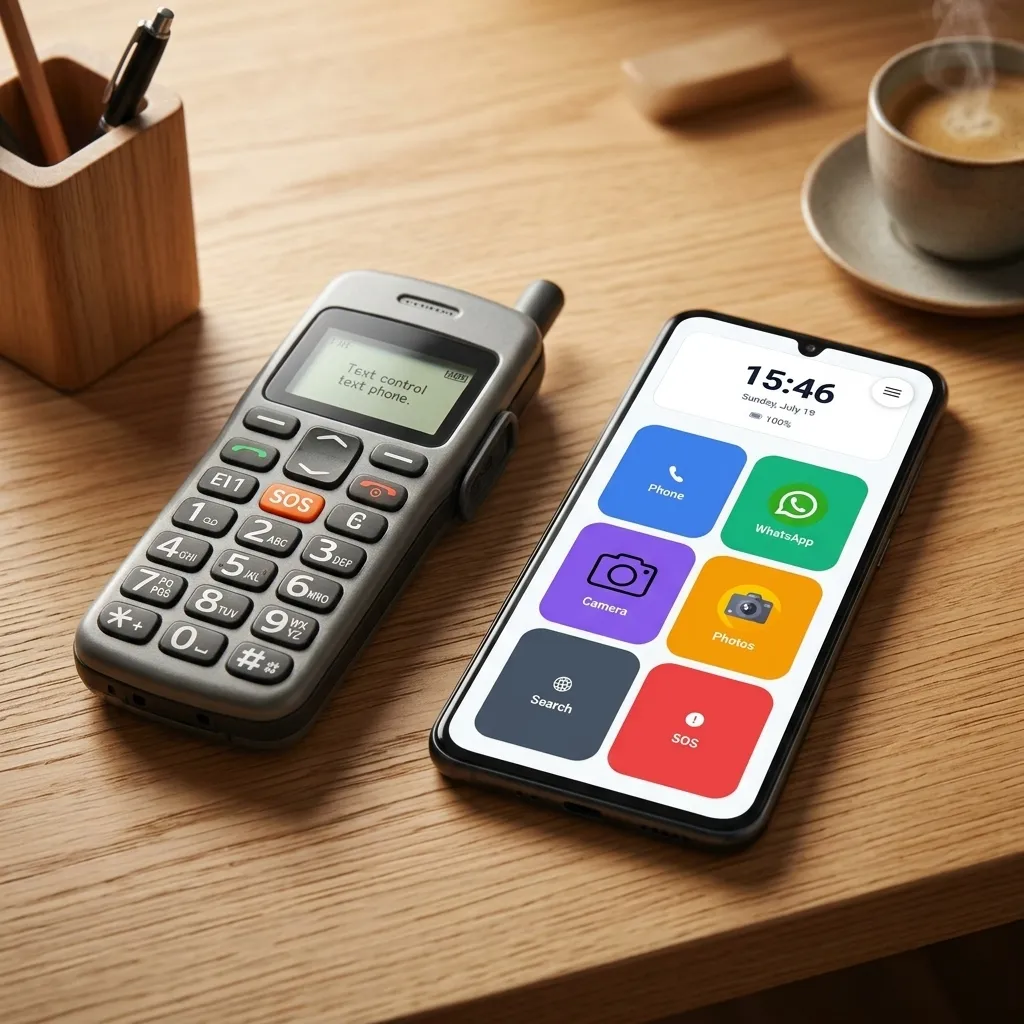
When it comes to choosing a mobile phone for an elderly relative, family members are often faced with a dilemma: Should we buy a dedicated, physical “senior phone” (from brands like Doro or Emporia), or should we get a standard Android smartphone (like a Samsung, Google, or Motorola) and set it up ourselves?
At first glance, a specialized senior phone seems like the easiest solution. However, in practice, these devices often come with significant drawbacks that can lead to frustration.
In this article, we compare both approaches and explain why a standard smartphone combined with a modern senior launcher like Juno is often the better, more flexible, and more future-proof choice.
What is a Dedicated Senior Phone?
Dedicated senior phones are mobile devices specifically designed for older adults. They come in two main varieties:
- Feature Phones: Classic clamshell or bar phones with physical buttons, small screens, and no internet access.
- Simplified Smartphones: Touchscreen devices running highly customized, proprietary versions of Android that cannot be easily changed or updated.
The Pros:
- Physical buttons (on feature phones) can be helpful for tactile feedback.
- Very basic menus out of the box.
- Built-in SOS emergency buttons on the back of the device.
The Cons:
- Outdated Hardware: They often have poor screen resolution, slow processors, and low-quality cameras. Taking a clear photo of the grandchildren is almost impossible.
- Limited App Support: Many simplified smartphones block the installation of popular apps like WhatsApp, banking apps, or public transport tickets.
- Stigmatization: Many seniors feel embarrassed using a device that looks like a medical aid or a toy.
- High Cost for Low Value: These devices are often surprisingly expensive considering their outdated specifications.
The Alternative: Standard Android + Senior Launcher App
Instead of buying specialized hardware, you can buy a standard, modern Android smartphone and install a senior launcher like Juno.
A launcher is a simple app that completely replaces the phone’s home screen interface. It overlays the complex system with large buttons and easy-to-read fonts, while keeping the underlying phone fully functional.
The Pros:
- High-Quality Hardware: You get a modern screen with high contrast, a fast processor, and a great camera. You can use a budget-friendly model (like a Samsung Galaxy A-series or Motorola G-series) which is often cheaper than a specialized senior phone.
- No Limitations: Standard apps like WhatsApp, YouTube, and Google Maps remain fully accessible. The senior can enjoy the modern digital world without the complex interface.
- Scalable Interface: As the user’s needs or eyesight change, the size of buttons, contrast, and layout can be adjusted in seconds. If they no longer need the simplified view, the launcher can simply be uninstalled.
- Family Support & Security: Advanced launchers allow settings to be locked with a PIN code, preventing the senior from accidentally deleting apps or changing volume settings.
- Normal Appearance: To the outside world, the senior is using a regular, modern smartphone.
The Cons:
- Requires about 10 minutes of initial setup by a family member or caregiver.
Side-by-Side Comparison
| Feature | Dedicated Senior Phone | Standard Smartphone + Juno Launcher |
|---|---|---|
| Camera Quality | ❌ Usually poor, low-res and blurry | ✅ Excellent high-definition cameras for family photos |
| WhatsApp & Apps | ❌ Blocked or unavailable | ✅ Full access with simple, easy-to-tap interface |
| Protection Against Misoperation | ❌ System settings easily misconfigured | ✅ Locked interface via Admin PIN and volume guard |
| Cost & Value | ❌ High price for outdated hardware | ✅ Excellent value (repurpose spare phone or budget Android) |
| Adaptability & Longevity | ❌ Fixed text sizes, hard to adjust | ✅ Fully customizable button sizes and contrast as vision changes |
Why standard smartphones with Juno are the perfect compromise
With Juno Launcher you get the best of both worlds: the simplicity and safety of a senior phone combined with the quality and app choice of a modern smartphone.
Juno protects older adults from accidental clicks, safeguards them from accidentally silencing their phone, and provides an integrated SOS emergency button. At the same time, it allows them to participate in family chats on WhatsApp and view sharp photos of their loved ones.
If you are looking for a phone for your parents or grandparents, we highly recommend choosing a budget-friendly Android device and setting it up with Juno. It takes just 10 minutes, saves money, and provides a much better experience for everyone.
Frequently Asked Questions (FAQ)
Is it better to buy a dedicated senior phone or convert an Android phone with Juno Launcher?
Converting an Android smartphone with Juno Launcher is usually much better. It provides far superior camera quality, full WhatsApp access, and scalable font/icon sizes while costing less than specialized senior hardware.
Can seniors use WhatsApp on a smartphone with Juno Launcher?
Yes! Juno Launcher allows you to place large direct-action tiles for WhatsApp text, voice calls, and video calls right on the home screen, making staying connected effortless for seniors.
Will seniors get confused by Android pop-ups or accidental taps?
No. Juno Launcher features a PIN-protected Admin Mode that locks the layout and prevents accidental app deletions, menu navigation, or accidental phone muting.
How long does it take to set up Juno Launcher on an Android smartphone?
Initial setup takes less than 10 minutes. Simply download Juno Launcher from the Google Play Store, set it as the default home screen, select your preferred icon sizes, and secure settings with a PIN.
Simplify Your Senior Relative’s Phone Today
Ready to give your parent or grandparent a stress-free smartphone experience? Transform any standard Android phone into an intuitive, safe senior smartphone in just 10 minutes.
Download Juno Launcher on Google Play and experience the perfect balance of simplicity, safety, and modern smartphone features.