The home screen
that thinks for Grandma.
Juno replaces the cluttered Android menu with large, clear buttons. Set up by the family in ten minutes – operated completely on its own, every day.
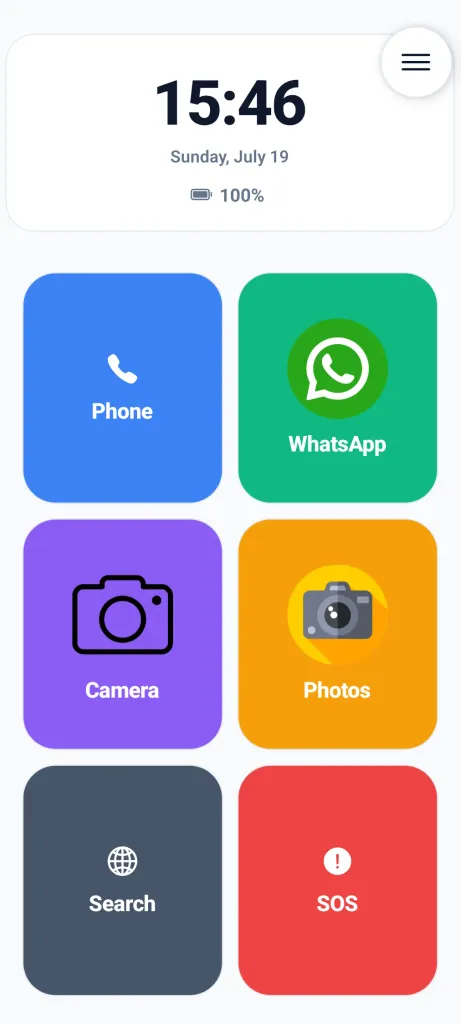
The accessible home screen with large, clear buttons and an SOS emergency call function.
A smartphone isn't built for 80-year-old eyes.
Too many icons
Dozens of app icons on a single screen overwhelm instead of help. Which one was WhatsApp again?
Buttons too small
Shaky hands and tiny font are a poor match. One slip – and the wrong app opens.
One click too many
An accidental press of the back button, and the familiar interface is suddenly gone.
Six features that truly matter in daily life
Each feature solves a specific problem that families have actually reported to us.
Buttons for shaky hands
Long press instead of short tap can be enabled for each button individually. No shaking, no accidental clicks.
Three contrast modes
Light, Dark, or maximum contrast with yellow text on black. The perfect view for any level of vision.
Large battery indicator
Below 20%, an unmissable prompt appears: "Please connect charger" - with a large graphic.
Volume protection
If the ringtone is accidentally muted, Juno automatically restores it to the configured minimum.
Tactile feedback
Every button press triggers a short vibration. Confident feedback that the click went through.
Stepless text zoom
Normal, Large, or Huge: The font size of all buttons and indicators can be adjusted with a slider.
One button for emergencies. No ifs or buts.
In an emergency, every second counts! Any unnecessary click is too much. The emergency button on the home screen requires only a single tap.
- 1A tap on the red button starts a loud 5-second countdown that can be canceled.
- 2After that, Juno automatically dials the saved emergency number, without further confirmation.
- 3At the same time, relatives receive an SMS with the location as a Google Maps link.
Set up by you. Operated completely on its own.
Juno has an admin area for all settings. The menu leads directly to settings after entering a PIN.
- 🎛️
Button Editor
Create contacts, apps, and websites as large, colorful tiles – photo included.
- ☁️
Cloud Backup
Back up the completed layout to Google Drive or export it as a code – restored in seconds on a new phone.
- 🔒
Kiosk Mode
Prevents minimizing the interface and blocks the back button so nothing gets lost.
"My grandma now calls all by herself, without me having to explain how to do it every time I visit."
Markus, 34 - set up Juno for his grandmother Helga, 81
Everything you need to know about Juno
Got questions about setup, costs, or safety features? Here are answers to the most common questions from families.
Is Juno Senior Launcher completely free or is it a subscription?
Juno can be downloaded and tested for free without risk. All features can be tried out in peace. If you want to use Juno permanently, you can unlock the full lifetime version via a single one-time in-app purchase. There are no monthly subscriptions, recurring fees, or ads.
How does Juno protect against accidental app deletion or system misconfiguration?
Juno features a dedicated Admin Mode protected by a custom PIN. Once activated, Kiosk Mode locks down system settings, disables app deletion, and prevents seniors from accidentally leaving or hiding the simplified interface.
How does the SOS emergency button work?
Tapping the prominent red SOS emergency button initiates a loud 5-second countdown that gives seniors time to cancel accidental presses. If not canceled, Juno automatically dials the stored primary emergency contact and sends an SMS with the exact GPS location as a Google Maps link to relatives.
How long does initial setup take for family members?
Setup takes about 10 minutes. Relatives can configure custom photo buttons for important contacts, select high-priority apps, adjust text size and contrast, and back up the complete configuration to Google Drive for easy restoration.
What Android smartphones and tablets are compatible with Juno?
Juno is compatible with all Android smartphones and tablets running Android 8.0 (Oreo) or newer. It works seamlessly on devices from Samsung, Xiaomi, Google Pixel, Motorola, Nokia, and other major manufacturers.
Can volume accidentally be muted by senior users?
No. Juno includes an automated Volume Protection mechanism. If the ringtone or media volume is accidentally reduced below the safety threshold, Juno automatically restores it to the configured minimum level so calls are never missed.
Test for free. Easy setup.
Download Juno directly from the Google Play Store. Try all features risk-free.
How to get started with Juno:
- 1
Install the app for free
Download the Juno Launcher from the Google Play Store onto your relative's Android smartphone.
- 2
Try it out in peace
Test all features, the large buttons, and the SOS emergency call function in daily life, no strings attached.
- 3
Unlock Lifetime (Optional)
If you like it, unlock the full version permanently via a one-time in-app purchase – no subscription, no hidden costs.
Scan with smartphone camera
Compatible with all Android smartphones from Android 8.0 Oreo onwards.
Set it up today. Grandma will be ready to go in ten minutes.
Juno runs on Android smartphones from version 8 and is available in German, English, Spanish, and more.
