A smartphone should give older adults independence and joy in everyday life – not frustration from cluttered notification panels or confusing menus. With today’s update to Juno version 1.0.6, we are introducing a senior-friendly shopping list, an accessible 3-tier notification system, direct WhatsApp chat tiles, and a completely redesigned admin area. Here is a complete overview of all new features and improvements.
💡 TL;DR – What’s new in Juno version 1.0.6:
- Built-in Shopping & Checklist App (
easy-launcher://list): Extra-large buttons to easily write, check off, and delete grocery items and daily to-dos.- Smart Notifications for Seniors: A clear notification summary card in plain language (“3 new WhatsApp messages”), subtle badges on app tiles, and an optional visual amplifier.
- WhatsApp Direct Chat Tile: 1-tap chat connection to loved ones in the familiar WhatsApp green (
#25D366).- Redesigned Admin Area: Streamlined 3-part layout, quick status dashboard, and visual validation when configuring tiles.
- Better Stability & Performance: Crash fixes for Android 16 (Xiaomi/Redmi), full tablet support, and 30+ synchronized languages.
1. The New Senior-Friendly Shopping and Checklist App
Following the introduction of our fully integrated, ad-free QR code scanner in the previous release, we are taking the next big step in everyday convenience: a dedicated shopping and checklist tool designed specifically for seniors.
Many elderly individuals rely on paper notes for grocery shopping, doctor appointments, or daily medication schedules. However, conventional note-taking and to-do apps from app stores are often overloaded with nested menus, tiny checkboxes, forced cloud logins, or intrusive advertisements.
With Juno 1.0.6, the launcher gains a seamlessly integrated, senior-optimized Checklist App (easy-launcher://list):
- Large Touch Targets: No fiddling with tiny checkmarks – items can be checked off effortlessly using the whole fingertip.
- High Contrast & Large Typography: Every entry is clearly legible at a glance, even with impaired vision.
- Effortless Adding & Clearing: Quickly type or voice-dictate new items; clear completed items with a single touch.
- 100% Ad-Free & Offline: No advertising banners, no data tracking, no accidental in-app purchases.
Family members can place the shopping list as a dedicated tile right on the main screen, allowing grandma or grandpa to access it with a single tap.
2. Notifications Reimagined: The 3-Tier System
One of the greatest hurdles on standard Android smartphones is the notification shade. Tiny icons in the status bar and cryptic push alerts frequently trigger anxiety: “Is this urgent? Did I do something wrong?”
In version 1.0.6, Juno introduces a thoughtful 3-tier notification system engineered for maximum clarity:
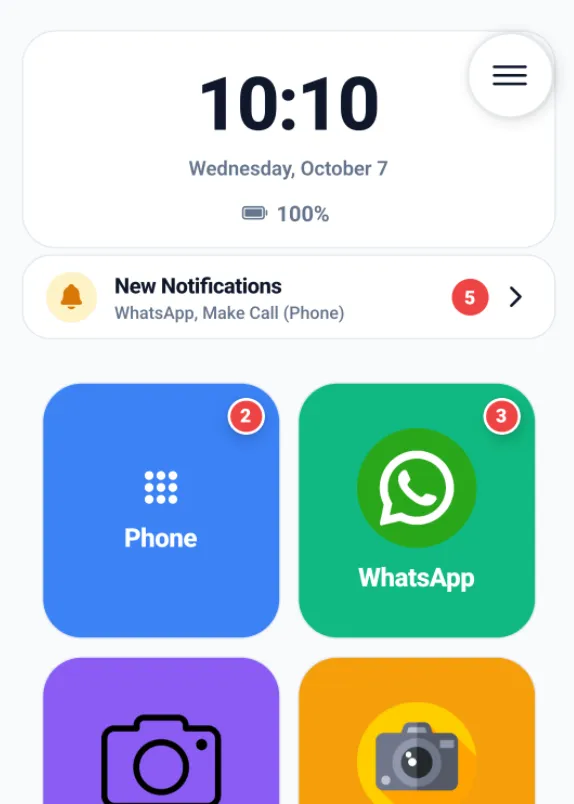 The new notification experience in Juno 1.0.6: The top summary card displays missed calls and WhatsApp messages in clear plain text, while badges on app tiles show the unread count.
The 3 Notification Levels:
-
Level 1 – Senior Notification Summary Card:
Positioned prominently at the top of the home screen, an easy-to-read info card alerts users to missed events in plain English (e.g., “1 missed call from Maria” or “3 new WhatsApp messages”). Tapping the card opens the relevant app immediately. This card can be easily toggled on or off in the admin settings. -
Level 2 – Standard Notification Badges (Red Dot with Counter):
A subtle red badge with a counter appears on relevant app tiles (e.g., WhatsApp or Phone). Crucial for seniors: Direct contact tiles (WHATSAPP_CHAT,CALL) are intentionally kept free of badges to prevent confusion and false alarms. -
Level 3 – Visual Notification Amplifier:
For users with significant visual impairments or cognitive challenges, caregivers can enable a gentle pulsing animation and an enhanced red border around tiles with unread notifications in the admin area (disabled by default).
🔒 Important Setup Note (Granting Permission):
For Juno to detect incoming notifications (such as missed calls or WhatsApp messages) and display them in the summary card and badges, Android’s Notification Access permission must be granted once.
Open Juno Settings (PIN-protected Admin Area) under Home Screen & Appearance > Notifications and tap Enable Permission. Juno will guide you directly to the appropriate system settings screen.
3. WhatsApp Direct Chats with Authentic Color
WhatsApp is the lifeline for communication in many families. Previously, direct contact tiles were primarily designed for phone calls. In version 1.0.6, the tile editor includes a dedicated tile type for WhatsApp Chat:
- Direct Phone Number Linking: The phone number is linked directly, opening the chat window with children or grandchildren immediately upon tapping.
- Authentic WhatsApp Signal Green (
#25D366): The tile is instantly recognizable using WhatsApp’s signature color scheme. - Custom Photo: Just like all contact tiles, you can assign a personal portrait photo of the family member.
Tip: You can set up two tiles side-by-side for the same family member – a green tile for WhatsApp chat and a blue tile for direct voice calls.
📱 Haven’t tried Juno Easy Launcher yet?
Turn any standard Android smartphone into a simple, secure, and frustration-free senior phone.
👉 Download Juno Launcher for free on the Google Play Store
4. Redesigned Admin Area & Simplified Setup
Caregivers and family members configuring the smartphone for their parents or grandparents will notice immediate improvements in version 1.0.6:
- Organized Settings: The settings area is now structured into three clear categories:
- Home Screen & Appearance (Grid layout, color themes, font size, notifications)
- Security & Protection (Admin PIN, Kiosk mode, volume lock)
- Backup & Support (Cloud backup, restore, feedback)
- Quick Status Dashboard: A compact header shows active security features at a glance (PIN enabled, volume protected, Kiosk mode on).
- Inline Validation in Tile Editor: Disruptive error popups have been replaced with helpful inline warnings and color highlights directly on form fields.
- Direct Feedback Button: Have questions or suggestions? Contact the development team directly via email (
info@dancingmacaw.com) straight from the settings menu.
5. Focus, Stability, and Modern Android Support
Under the hood, we optimized Juno for the latest Android standards and removed unnecessary complexity:
- Focus on Simplicity: The internal gallery and “Picture of the Day” features have been removed. Photo tiles now open the operating system’s native gallery app directly. This saves storage space and eliminates duplicate menus.
- Android 16 (SDK 36) Image Picker Fix: Resolved an image crop exception (
CropImageContractIllegalArgumentException) affecting newer Xiaomi and Redmi devices. - Optimized for Tablets & Large Screens: Juno now fully supports landscape and portrait tablet viewports with responsive scaling (
resizeableActivity=true). - 30+ Synchronized Languages: All strings and help texts have been thoroughly translated and synchronized across more than 30 languages.
Summary of Changes in Version 1.0.6
| Category | New Feature / Improvement | Benefit for Seniors & Families |
|---|---|---|
| Shopping List | New easy-launcher://list app with large buttons |
Keep track of groceries & daily to-dos without paper notes |
| Notifications | Summary Card + Badges + Visual Amplifier | Never miss important family calls or messages again |
| Dedicated WhatsApp Chat tile type | Instant 1-tap chat access without searching through contact lists | |
| Settings | 3-part layout & Quick Status Dashboard | Fast, intuitive configuration in just a few minutes |
| Tile Editor | Inline validation instead of popups | Error-free button editing and customization |
| System & Stability | Android 16 fix, tablet support, R8 optimizations | Faster launch times and unmatched reliability |
Frequently Asked Questions (FAQ)
How do I get the version 1.0.6 update?
The update is distributed automatically via the Google Play Store. You can also open the Play Store app, search for Juno Easy Launcher, and tap Update.
Does the update to version 1.0.6 cost anything?
No. All feature updates and stability improvements are completely free for all users.
How do I enable the notification feature?
For Juno to display notifications, Android requires Notification Access permission. Navigate to Juno Settings > Home Screen & Appearance > Notifications and switch on the toggle.
How do I add the new shopping list to the home screen?
Open Admin Settings with your 4-digit PIN, tap an empty tile (or edit an existing one), set the action to Internal Feature, and select Shopping List / Checklist.
Why do direct contact tiles not display red notification dots?
To prevent confusion. If a tile is labeled “Son Thomas”, but a message arrives in a family group chat, a badge on the individual contact tile could be misleading. Badges are displayed on the main app tile and summarized in the top card.
Does Juno 1.0.6 work on Android tablets?
Yes. Version 1.0.6 fully supports flexible screen orientations and tablet displays, making it ideal for large-screen senior use.
Conclusion: The Most Polished Juno Experience Yet
Version 1.0.6 makes Android smartphones even more reliable and practical for older adults. Whether shopping at the supermarket or staying in touch with grandchildren – Juno provides safety, comfort, and peace of mind.
Try out the new features today:
👉 Download Juno Easy Launcher for free on the Google Play Store